
جدول المحتويات
تطور التصنيع الآلي الدقيق
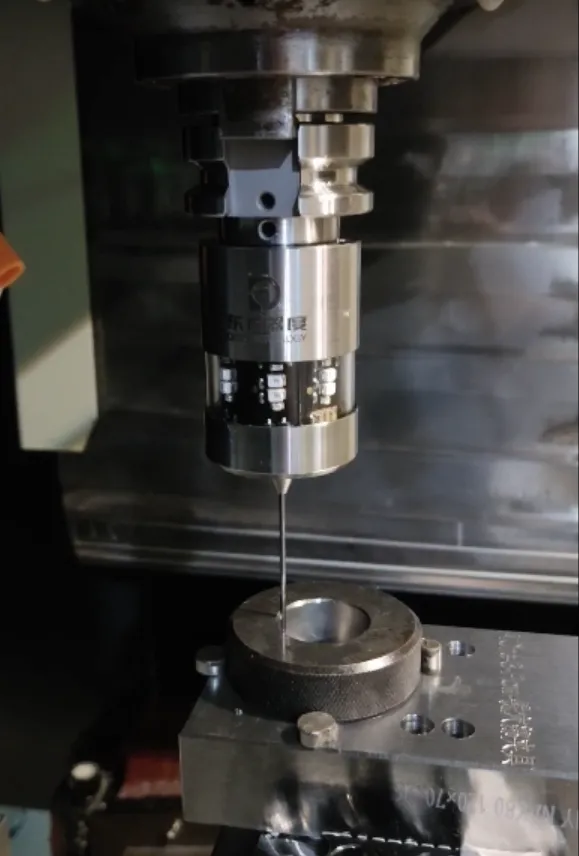
يشهد التصنيع الآلي الدقيق تحولاً بفضل التأثير الثوري لمسابير اللمس الرقمية باستخدام الحاسب الآلي CNC، حيث تقدم نهجًا أكثر دقة وفعالية لقياس وإعداد قطع العمل. تستخدم هذه المجسات مجسات دقيقة لقياس سطح قطعة العمل، ثم يتم استخدام البيانات المجمعة لإنشاء تمثيل رقمي للجزء. وبعد ذلك، يُستخدم هذا النموذج كأساس لإنشاء برنامج ماكينة بنظام التحكم الرقمي الذي يقوم بتصنيع الجزء بدقة وفقًا للمواصفات.
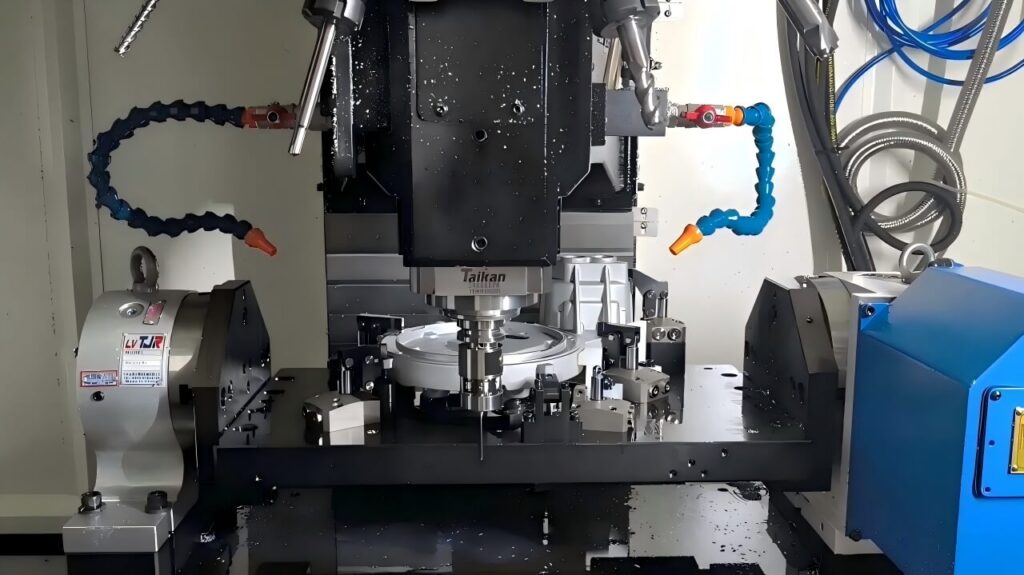
تتميز المجسات اللمسية الرقمية باستخدام الحاسب الآلي بالعديد من المزايا مقارنةً بتقنيات القياس التقليدية:
- الدقة: يمكن أن تحقق المجسات التي تعمل باللمس قياسات بدقة 0.0001 بوصة، وهو ما يمثل تحسنًا كبيرًا مقارنةً بالطرق التقليدية مثل مؤشرات الاتصال أو الفرجار.
- الكفاءة: تتفوق المجسات التي تعمل باللمس في قياس الأجزاء المعقدة بسرعة وبدون عناء، مما يؤدي إلى توفير الوقت والتكلفة.
- متعددة الاستخدامات: هذه مجسات التصنيع باستخدام الحاسب الآلي يمكن تطبيقها لقياس مجموعة متنوعة من الأجزاء، بما في ذلك الأجزاء ذات الأشكال أو السمات المعقدة.
الفحص باستخدام الحاسب الآلي المفتوح المصدر
لقد أدى ظهور برمجيات السبر باستخدام الحاسب الآلي مفتوحة المصدر إلى إضفاء الطابع الديمقراطي على الوصول إلى المجسات اللمسية، مما يتيح للهواة والشركات الصغيرة الاستفادة من مزاياها. وعادةً ما تكون هذه البرمجيات متاحة مجاناً، ويمكن تصميمها لتناسب المتطلبات الخاصة بالمستخدم.
أحد برامج السبر باستخدام الحاسب الآلي مفتوحة المصدر الشائعة والمفتوحة المصدر هو TouchDRO، ويمكن الوصول إليه من خلال عنوان URL هذا: TouchDRO. تتضمن ميزات TouchDRO الجديرة بالملاحظة ما يلي:
- واجهة المستخدم الرسومية: تسهّل واجهة TouchDRO الرسومية سهلة الاستخدام الاستخدام، حتى للمبتدئين.
- أوضاع قياس متنوعة: يشتمل TouchDRO على أوضاع قياس متنوعة مثل القياس من نقطة إلى نقطة والخطي والدائري.
- إنشاء برنامج بنظام التحكم الرقمي باستخدام الحاسب الآلي: يمكن للمستخدمين استخدام TouchDRO لإنشاء برامج ماكينات بنظام التحكم الرقمي (CNC) التي تعمل بالماكينات بدقة لتلبية المواصفات.
أسلاك مسبار اللمس CNC
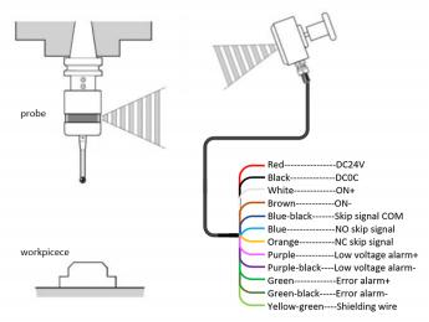
عملية توصيل الأسلاك لـ مسبار اللمس CNC بسيطة نسبيًا. عادةً ما يتم توصيل المسبار بلوحة فصل، والتي بدورها تتصل بوحدة التحكم في ماكينة التحكم الرقمي باستخدام الحاسوب. لا توفر لوحة الاختراق اتصالاً مناسبًا بين المجس ووحدة التحكم فحسب، بل توفر أيضًا الطاقة للمجس.
توضح الخطوات التالية الإجراء الأساسي لتوصيل مسبار اللمس باستخدام الحاسب الآلي الرقمي CNC:
- قم بتوصيل المسبار بلوحة الاختراق.
- اربط لوحة الاختراق بوحدة التحكم في ماكينة التحكم الرقمي CNC.
- قم بتشغيل كل من ماكينة CNC والمسبار.
- قم بتكوين البرنامج لدمج المسبار.
بمجرد توصيل المسبار وتهيئته بشكل صحيح، يصبح أداة قيّمة لقياس القِطع وإنشاء برامج الماكينات بنظام التحكم الرقمي.
الخاتمة
تلعب المجسات اللمسية الرقمية باستخدام الحاسب الآلي دورًا محوريًا في تعزيز التصنيع الآلي الدقيق، حيث تقدم مزايا مثل زيادة الدقة والكفاءة وتعدد الاستخدامات مقارنةً بطرق القياس التقليدية. وقد أدى ظهور برمجيات المجسات بنظام التحكم الرقمي المفتوحة المصدر إلى توسيع نطاق هذه المزايا لتشمل الهواة والشركات الصغيرة. يُعد توصيل مسبار اللمس بنظام التحكم الرقمي باستخدام الحاسوب عملية بسيطة، وباستخدام الأدوات والمعرفة المناسبة، يمكن لأي شخص استخدام مسبار اللمس لرفع دقة وكفاءة عمليات التصنيع الآلي باستخدام الحاسوب. مرحبًا بكم في الاتصال بـ كيدو للمقاييس الفريق إذا كنت بحاجة إلى معلومات أكثر تفصيلاً.
